Explaining Automated Classification Decisions with AI

Explaining Automated Classification Decisions with AI

Explaining Automated Classification Decisions with AI

Role

Role

Lead Designer

Lead Designer

Team

Team

Sole designer · PM · Engineer

Sole designer · PM · Engineer

Duration

Duration

1.5 months

1.5 months

All data shown is for illustration purposes only.

Summary

The platform ran two classification models side by side, and when they disagreed it silently picked the stricter one. Owners saw their application marked sensitive with no reason and no way to respond. I redesigned the classification page around an AI-generated explanation of why the classification changed and what the owner can do next. It was the best-received element in review, and the “why is this sensitive?” tickets that had been reaching PMs stopped.

The platform ran two classification models side by side, and when they disagreed it silently picked the stricter one. Owners saw their application marked sensitive with no reason and no way to respond. I redesigned the classification page around an AI-generated explanation of why the classification changed and what the owner can do next. It was the best-received element in review, and the “why is this sensitive?” tickets that had been reaching PMs stopped.

What I owned

  • Mapped where each classification came from before designing anything.

  • Designed the conflict states and the AI explanation.

  • Defined the email notification trigger.

  • Mapped where each classification came from before designing anything.

  • Designed the conflict states and the AI explanation.

  • Defined the email notification trigger.

Problem

The platform ran two classification systems side by side — a legacy model and a newer one. Applications harvested into the platform sometimes arrived carrying both, and the two didn’t always agree.
When they disagreed, the platform resolved the conflict by assigning the higher of the two classifications. No explanation or notification was given, and there was no path to challenge it. An application could be marked sensitive without its owner knowing why.

The platform ran two classification systems side by side — a legacy model and a newer one. Applications harvested into the platform sometimes arrived carrying both, and the two didn’t always agree.
When they disagreed, the platform resolved the conflict by assigning the higher of the two classifications. No explanation or notification was given, and there was no path to challenge it. An application could be marked sensitive without its owner knowing why.

How we found out

Illustration of a compliance lead noting that application owners should take ownership of classification
Jira board full of tickets from owners asking why their application's classification changed

Tickets from the

last 60 days

Understanding the two classifications

Before designing anything, I needed to understand where each classification actually came from, because the source determines what a user can do about it.

Before designing anything, I needed to understand where each classification actually came from, because the source determines what a user can do about it.

Classification 1 (C1)

Classification 1 (C1)

Comes from the columns under the application.

Comes from the columns under the application.

Classification 2 (C2)

Classification 2 (C2)

Comes from a completed assessment and a sample data upload.

Comes from a completed assessment and a sample data upload.

When a mismatch happens, the platform resolves the conflict by assigning the higher of the two classifications.

The questions that shaped the design

Working through the flow surfaced four questions the interface had to answer:

Q1. What is the owner supposed to do when a mismatch occurs?

Verify the assigned classification.

Q2. Why does it matter to
them?

Q2. Why does it matter to them?

A sensitive classification can trigger downstream security obligations. An SSP (System Security Plan), for example, carries consequences for how the application must be operated.

Q3. What if they disagree with the assigned classification?

They need to give the information that would change it, and that information differs depending on which classification is in play.

Q4. How would they even know there's a mismatch?

Email notification. A passive state change isn’t otherwise surfaced on a page most owners rarely visit.

Before

The existing classification page displayed the planned classification alongside every table included in the classification. It was accurate but static — a readout with no reasoning and no action.

Existing classification page annotated with its classification source and update information

Beyond the interface

Existing classification page annotated with owner pain points about unexplained sensitive labels

The redesign

I started from the flows rather than the layout, mapping what "change this" means in each state.

Flow diagram of how a classification mismatch is resolved and explained in each state
Design exploration board with existing screens, open questions and two layout options

Below is the redesigned classification page.
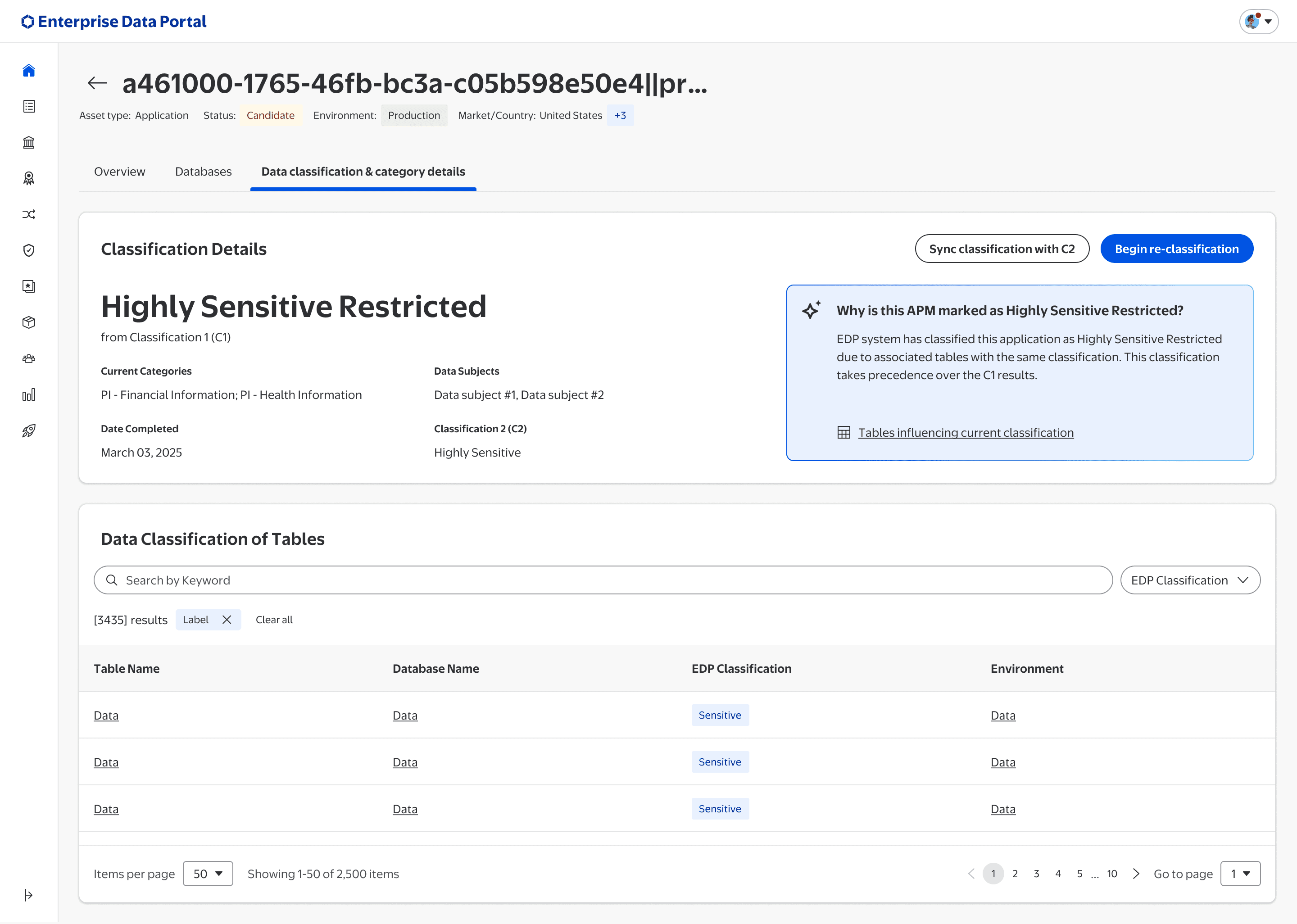
Redesigned classification page with an AI explanation of why the application is highly sensitive restricted
Redesigned page annotated to show the classification explanation and the data that influenced it
Redesigned page annotated with options to re-classify, sync with existing classification and view influencing tables

Feedback and outcomes

  1. The AI explanation was well received. It was the most positively received element with both compliance and application owners, and it addressed the ticket pattern the PMs had been absorbing.

  2. Follow-on discussion. Once explainability was addressed, discussion shifted to notification design and automating the resolution process.

Results

Close to 20 tickets came in over one to two months after the new classification model was introduced, most asking why an application had been marked sensitive. Since the redesign, PMs have not received that question — owners can see the reasoning and their next step on the page itself.

Close to 20 tickets came in over one to two months after the new classification model was introduced, most asking why an application had been marked sensitive. Since the redesign, PMs have not received that question — owners can see the reasoning and their next step on the page itself.

Other projects

Other projects

Other projects

Nikhil Dasari

Nikhil Dasari

Designed in Arkansas, mentally relocated to Big Sur. Photo by George Cox on Unsplash

Designed in Arkansas, mentally relocated to Big Sur. Photo by George Cox on Unsplash